
Lifetime Value (LTV) is the average revenue generated by a user from their first session to the moment they stop using your app or game. It combines two things: how long users stay (Lifetime) and how much they spend while they're there (ARPU).
LTV is the foundation of sustainable growth. For UA teams, it answers: how much can we pay for an install? For product teams, it answers: are we building something users value enough to stick around and pay for?
This glossary entry covers how to calculate LTV, predict it early, and improve it — from both product and acquisition perspectives.
What Is LTV?
LTV — also written as CLV (Customer Lifetime Value) — is the total revenue a user generates from installation to churn. It's not a snapshot metric like DAU or ARPU. It's a forward-looking number that captures the long-term value of a user.
For a F2P mobile game, LTV might be $1.20 for a casual user and $45 for a mid-core player. For a subscription app, it's monthly price × average subscription length minus churn. The number varies enormously by genre, region, and monetization model — which is why LTV always needs context.
LTV is used differently depending on your role. UA managers use it to set bid caps and evaluate channel efficiency. Product managers use it to measure the revenue impact of product changes — a new onboarding flow, a rebalanced paywall, a feature update. Both perspectives matter, and both start with the same number.
Learn more about what LTV is and how to use it →
How to Calculate LTV
The core formula:
| LTV = Lifetime × ARPU |
|---|
Where:
- Lifetime = average number of days a user stays active
- ARPU = average revenue per active user per day
Example: If your average user stays active for 30 days and generates $0.05 per day, LTV = $1.50.
In practice, LTV is calculated for cohorts — not individual users. You take a group of users who installed on the same day, track their revenue over time, and plot it as a curve. That curve is your Cumulative ARPU (CARPU) — and it keeps growing as long as users stay active.
The challenge: you need users to fully churn before you know their real LTV. For most products that takes months. That's why LTV prediction matters.
How to Predict LTV Early
Waiting 90 or 180 days to know your LTV isn't practical — whether you're making UA bids today or deciding whether to ship a product update next sprint.
The simplest approach: look at Day 7 CARPU and apply a multiplier based on your historical retention curve. If Day 7 CARPU is typically 20% of Day 180 CARPU, you can estimate long-term LTV from early data.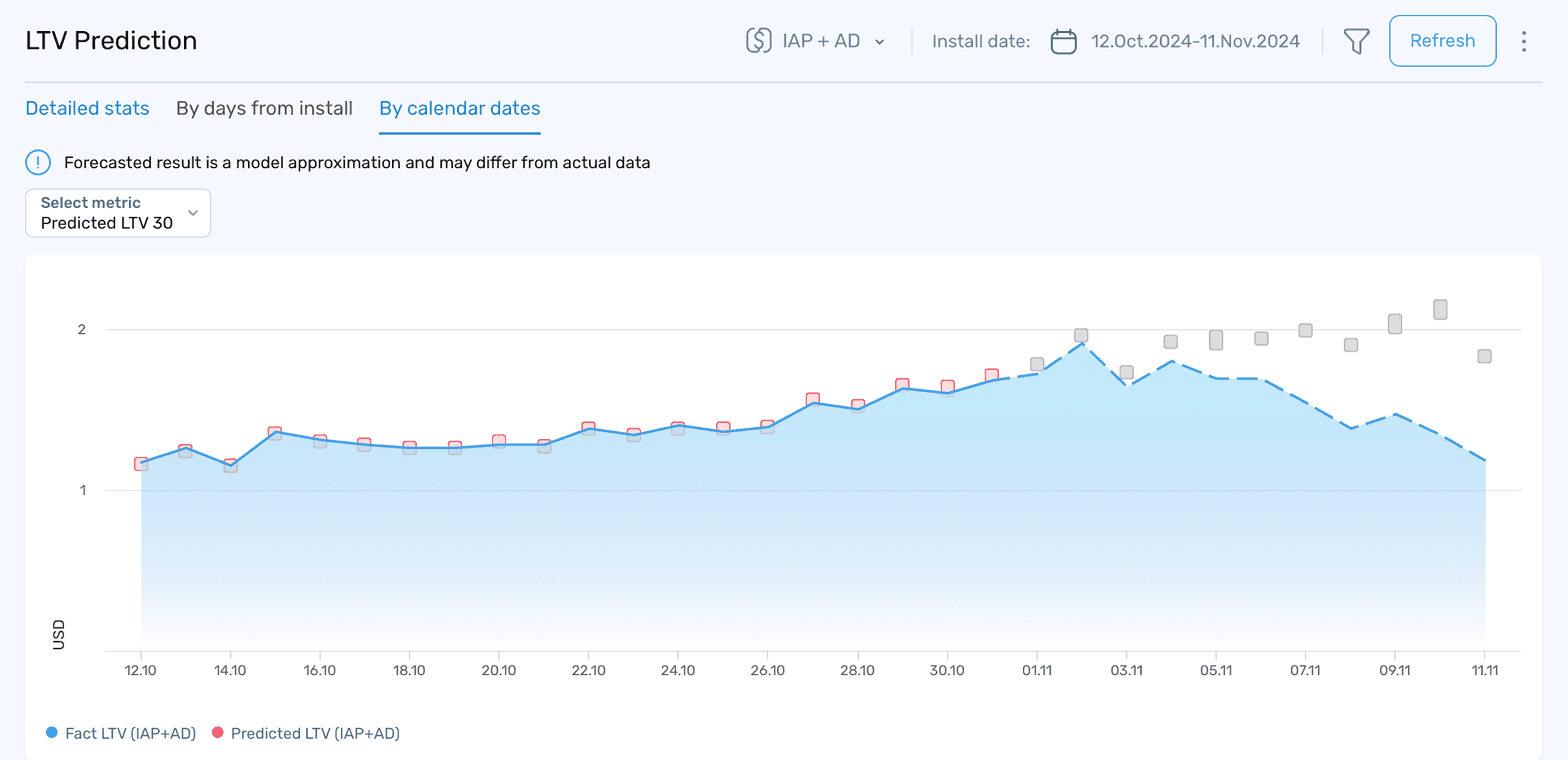
Screenshot: LTV Prediction report in devtodev — Fact LTV vs Predicted LTV (IAP + AD) by calendar dates, filterable by install date range and revenue source.
devtodev uses AI models to predict LTV with around 90% accuracy based on user interactions and payment events in the first few days after install. The model forecasts revenue for up to 360 days — so UA teams can make acquisition decisions without waiting for cohorts to mature, and product teams can evaluate the revenue impact of a new feature within days of shipping it.
LTV vs CAC: The Number That Matters Most
LTV on its own is just a number. What makes it actionable is the ratio to Customer Acquisition Cost (CAC) — or in mobile, Cost Per Install (CPI).
The widely used benchmark: LTV should be at least 3× CPI to ensure profitability after platform fees, refunds, and overhead.
These are industry guidelines based on standard unit economics practice. Your ratio will depend on your margin structure and payback period targets.
| Ratio | What it means |
|---|---|
| LTV < CPI | You're losing money on every install |
| LTV = 1-2× CPI | Marginally profitable, little room for error |
| LTV = 3× CPI | Healthy — standard target |
| LTV > 3× CPI | Strong unit economics, room to scale UA |
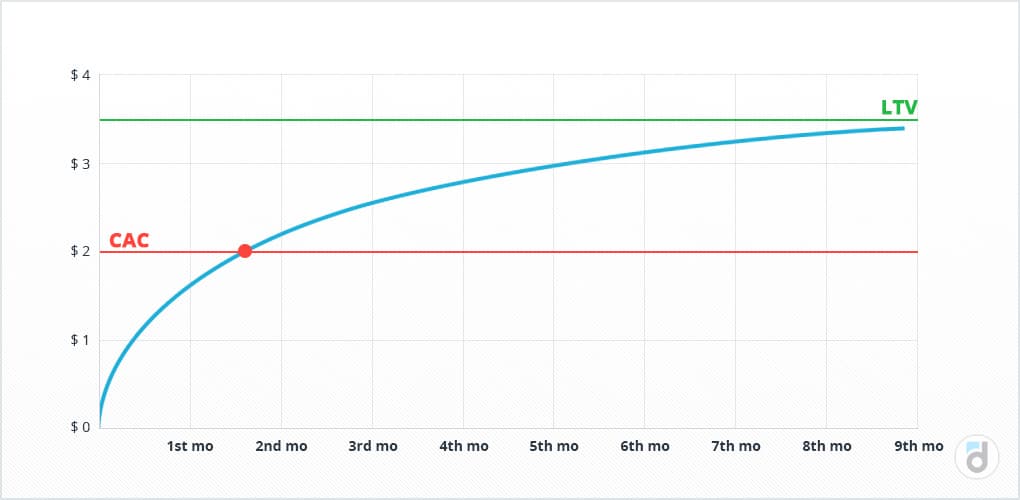
Screenshot: devtodev LTV/CAC chart showing the payback point — the moment cumulative revenue per user crosses the acquisition cost line, reached here around the end of month 2.
For UA teams, a low ratio means tightening bids or finding cheaper channels. But for product teams, a persistently low LTV/CPI ratio is often a signal of a deeper problem: users aren't staying long enough or spending enough — and that's a product issue, not a media buying one. Fix the product first, then scale acquisition.
How to Increase LTV
LTV is a product of Lifetime and ARPU — so every lever that moves either one improves LTV.
Improve retention first. Longer Lifetime directly raises LTV. A user who stays 60 days instead of 30 generates twice the revenue at the same ARPU. More importantly, users who churn before reaching the monetization stage generate nothing at all. D1 and D7 retention are the product team's first priority — they determine how many users make it far enough to spend.
Increase paying share. Convert more free users into paying ones. This responds to product decisions: offer timing, onboarding quality, the moment users first see value. Showing the right offer at the right moment in the user journey is a product design problem, not just a pricing one.
Raise ARPPU. Get existing payers to spend more. This responds to pricing strategy, bundle design, and high-value content — all product decisions. If ARPPU is dropping among 30-day users, they're spending less before leaving. That's a signal to review what high-retention payers have in common and build more of it.
Optimize paywall timing. Showing the paywall too early kills conversion. Too late and users have formed a habit of playing for free. The optimal timing varies by genre and audience — test it with A/B testing rather than guessing. A one-week shift in paywall timing can move LTV significantly without changing anything else.
Segment and target. Not all users have the same LTV potential. Whale users — the top 1–2% of spenders — can generate 50–60% of total revenue. Identifying them early and tailoring their product experience can significantly raise overall LTV without touching the broader user base.
Use cohort comparison to measure product impact. Every time you ship a major update, compare the LTV curve of the cohort that installed before vs. after. That's how product teams know whether a change actually improved long-term revenue — or just moved short-term metrics without affecting user value.
Learn more about identifying and re-engaging high-value users →
Takeaways
- LTV is the total revenue a user generates over their time in your app or game — the foundation of both acquisition and product decisions.
- The core formula: LTV = Lifetime × ARPU. Calculate it for cohorts, not individuals.
- LTV should be at least 3× CPI for healthy unit economics. A persistently low ratio often signals a product problem, not a UA problem.
- Early LTV prediction — based on Day 7 behavior — lets UA teams make acquisition decisions, and product teams evaluate feature impact without waiting months for cohorts to mature.
- To raise LTV: improve D1/D7 retention first, then Paying Share and ARPPU. Both are product levers.
- Compare LTV curves before and after major updates — that's how product teams measure real revenue impact, not just engagement.
Find out your LTV by cohort, channel, and revenue source — and see how product changes affect it over time. Explore devtodev →