
Active users are unique users who had at least one session during a selected time period. DAU counts them per day, WAU per week, MAU per month — each window shows a different layer of engagement.
For product teams, these metrics answer: is our core audience stable? For UA teams, they reveal whether acquisition is adding real engagement or just inflating install counts. This glossary entry covers how DAU, WAU, and MAU are calculated, how they relate to each other, and how to use them to diagnose product health.
What Are DAU, WAU, and MAU?
DAU (Daily Active Users) — unique users who opened the app at least once on a given day. The primary engagement metric for products that rely on daily interaction: mobile games, social apps, and tools with daily workflows.
WAU (Weekly Active Users) — unique users who opened the app at least once in a seven-day period. More relevant for products that don't demand daily usage — productivity apps, casual games, or platforms with weekly content cycles.
MAU (Monthly Active Users) — unique users who opened the app at least once in a 30-day period. The standard metric for investors and growth reporting. MAU captures your total active audience but smooths over daily and weekly fluctuations.
One important clarification: WAU is not the sum of 7 DAUs, and MAU is not the sum of 30 DAUs. All three count unique users — a person who opens the app every day counts as 1 DAU each day, but still just 1 MAU for the month.
Learn more about active users: DAU, WAU, and MAU →
How to Calculate DAU, WAU, and MAU
Each metric counts unique users within its time window — regardless of how many sessions they had.
DAU example: Users 1, 2, and 3 open the app on Monday. Users 2 and 4 open it on Tuesday. DAU for Monday = 3. DAU for Tuesday = 2. Each day is counted independently.
WAU example: Users 1, 2, 3, and 4 opened the app at least once between Monday and Sunday. WAU = 4 — even if user 1 opened it every day and user 4 opened it only once.
MAU example: All users who opened the app at least once in October. A user who opened the app on October 1st and never returned still counts toward October MAU.
This distinction matters for interpretation. A rising MAU with a flat or falling DAU means you're retaining monthly users but losing daily engagement — a sign of weakening core loop or seasonality effects.
Sticky Factor: DAU/MAU Ratio
The relationship between DAU and MAU is itself a metric — Sticky Factor (also called Stickiness).
| Sticky Factor = DAU / MAU × 100% |
|---|
A Sticky Factor of 20% means roughly 1 in 5 monthly users opens the app on any given day. For mobile games, 20% is a reasonable baseline. Social and messaging apps often reach 50%+.
Sticky Factor drops when MAU grows faster than DAU — common when UA is driving installs that don't convert to daily habits. It's one of the earliest signals that acquisition quality is declining.
How to Use DAU, WAU, and MAU
Monitor trends, not snapshots. A single DAU number means little. What matters is the trend — is DAU growing week-over-week? Is the DAU/MAU ratio stable after a product update? Sudden drops in DAU are often the first signal of a server issue, a bad release, or an algorithm change.
Segment to find the signal. Aggregate DAU can mask important shifts. A stable total DAU with falling DAU from a key market, or rising DAU driven entirely by a new acquisition campaign, tells a different story than the headline number.
Segmentation options in devtodev include: paying vs. non-paying, by install date, by country, by device, and by acquisition channel. For product teams, install-date segmentation is especially useful — it shows whether new cohorts engage at the same rate as older ones.
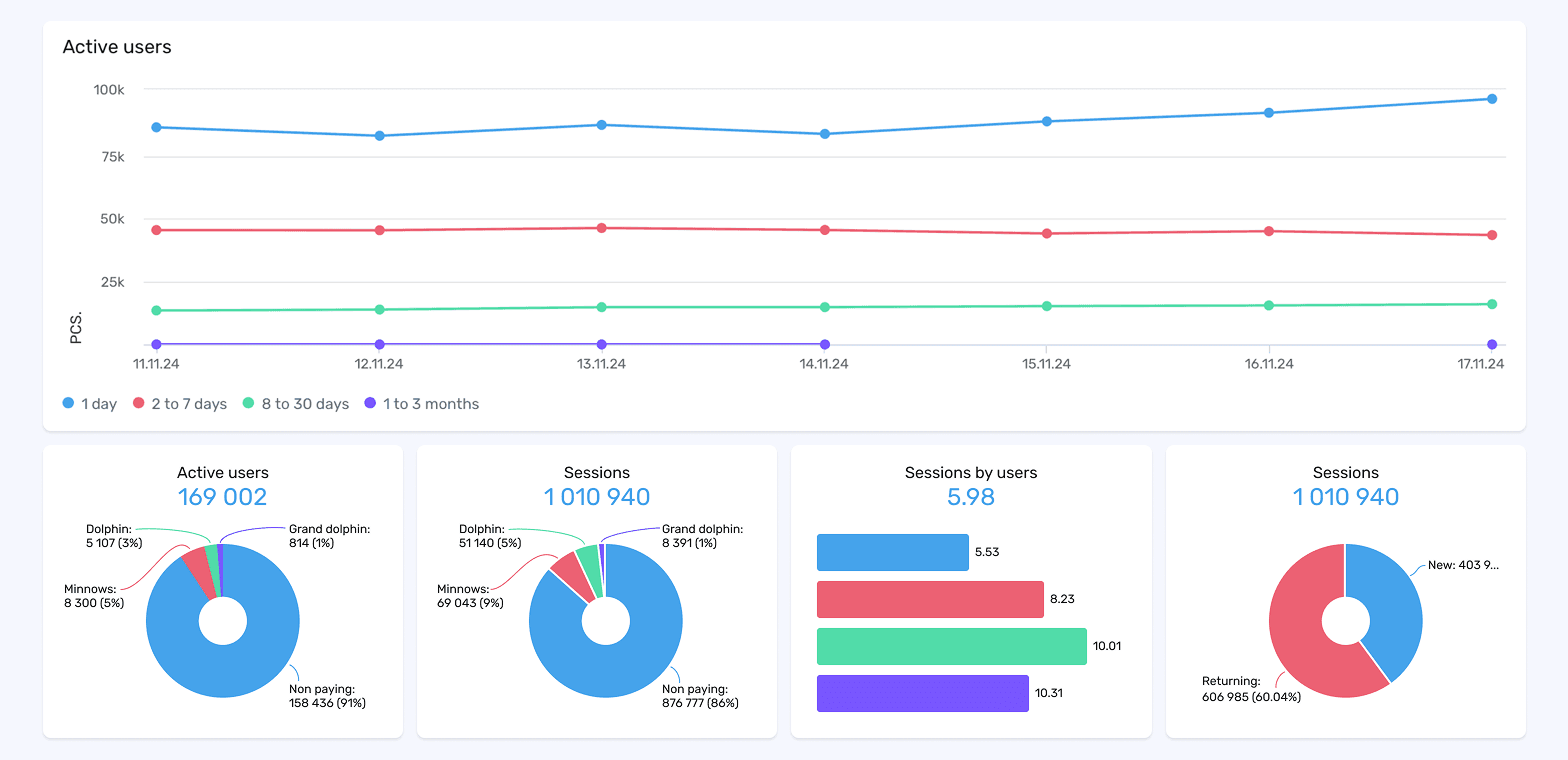
Screenshot: devtodev Active Users report showing daily active users segmented by install recency (1 day, 2–7 days, 8–30 days, 1–3 months), with breakdowns by user type (Dolphin, Minnows, Non-paying) and session data.
Connect DAU to revenue. DAU alone doesn't measure product health — ARPDAU (Average Revenue Per Daily Active User) does. A rising DAU with falling ARPDAU means your new users are less valuable than your existing ones. That's a traffic quality problem, not a product success.
Learn more about the top 12 user engagement metrics for mobile apps →
What Affects DAU, WAU, and MAU?
UA campaigns cause short-term DAU spikes. If DAU drops sharply after a campaign ends, the acquired users aren't forming habits.
Product updates can move DAU in either direction. A well-received feature drives re-engagement. A bad release — a crash, a difficulty spike, a monetization change that feels unfair — shows up in DAU within 24 hours.
Seasonality affects all three metrics. Mobile games typically see DAU peaks on weekends and holidays. Productivity apps often inverse this pattern. Knowing your seasonal baseline prevents misreading normal fluctuation as a product problem.
Notification strategy directly influences daily return rates. Push notifications that create genuine urgency — a limited-time event, a friend action, a personalized trigger — sustain DAU. Generic notifications erode it.
Takeaways
- DAU, WAU, and MAU count unique users who had at least one session in their respective time window — not the sum of sessions.
- WAU ≠ 7 × DAU, MAU ≠ 30 × DAU. Each metric counts unique users independently.
- Sticky Factor (DAU/MAU) measures how consistently monthly users return daily. A declining ratio often signals a UA quality or core loop problem.
- Always segment active user metrics — aggregate DAU hides market-level shifts, monetization differences, and cohort quality changes.
- Connect DAU to ARPDAU: rising users with falling revenue per user is a traffic quality problem, not growth.
- DAU drops within 24 hours of a bad release. It's one of the fastest feedback signals available to product teams.
See your DAU, WAU, and MAU trends segmented by country, channel, and cohort. Explore devtodev →